Design a Better Brand: The Round Beer Coaster Mockup
When you're developing a new brand identity or launching a new product, the small details often make the biggest impact. We focus so much on the logo, the color palette, and the typography for the website that we sometimes overlook the tangible, everyday items that customers interact with. In the hospitality industry, particularly for breweries, pubs, and cafes, the beer coaster is one of the most powerful branding tools available. It sits right in front of the customer, often for an hour or more. To present these designs professionally to clients or to visualize your own brand, a high-quality Round Beer Coaster Mockup is essential.
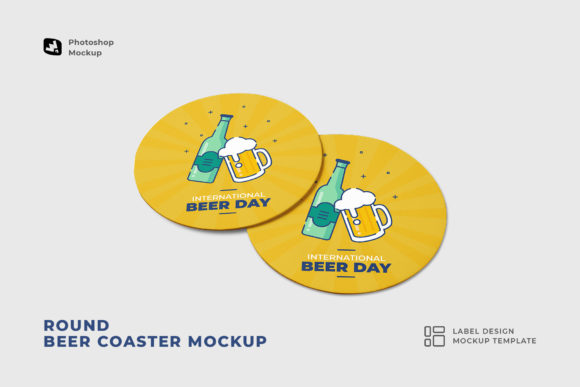
This specific mockup set is designed to solve a common problem for designers: how to showcase circular branding elements realistically without spending hours on manual 3D rendering. The set includes two distinct top-view perspectives of circular coasters, providing a clean, uncluttered canvas. Because the view is from directly above, the focus remains entirely on the artwork. There is no distracting perspective distortion or extreme lighting to worry about. This makes it an ideal tool for testing how a logo design sits within a circular constraint, which is a classic challenge in packaging design.
Streamlining the Design Workflow
One of the standout features of this Round Beer Coaster Mockup is the attention to user experience within the file structure. If you have ever downloaded a poorly organized mockup, you know the frustration of hunting through hundreds of unnamed layers just to find the smart object where your design goes. This file avoids that headache entirely. It utilizes Smart Object technology, which is the industry standard for non-destructive editing in Photoshop. You simply double-click the layer thumbnail, paste your artwork into the new window, save, and the main file updates automatically.
The creators have also included "Smart Item Shortcuts" at the top of the layer stack. This is a subtle but massive time-saver. It means you don’t have to drill down into folder hierarchies to make changes. For a busy marketer or entrepreneur who might not be a Photoshop wizard, this accessibility is crucial. The file is built for Photoshop CC and above, ensuring compatibility with modern rendering engines. The image quality is set to 300dpi with an artboard resolution of 6000 x 4000 pixels. This high resolution ensures that your final output is crisp enough for print portfolios, large website hero banners, or even printed proposals for clients.
Visual Appeal and Photorealism
The goal of any mockup is to bridge the gap between a flat digital file and a physical product. The Round Beer Coaster Mockup achieves this through photorealistic textures. Coasters have a specific materiality—usually thick cardboard or pulp paper. A good mockup captures the subtle grain and texture of this material so that the design looks like it is actually printed on paper, not just floating on a digital layer. This adds a layer of professionalism to your brand identity presentations.
Because the files are organized and the layers are clearly labeled, you can also adjust the colors and backgrounds easily. This flexibility allows you to match the mockup to the specific aesthetic of the brand you are working on. For example, if you are designing for a craft brewery with a rustic vibe, you might want to adjust the background to look like a dark wood bar top. If you are designing for a modern, minimalist lounge, you might prefer a clean marble surface. The ability to apply the coaster to any background makes this a versatile design asset.
Practical Applications for Creators
While this is technically a tool for visualizing coaster designs, its utility goes far beyond just printing coasters. Here are a few practical ways different professionals can use this Round Beer Coaster Mockup:
- Logo Presentation: Logos often need to work in various shapes—square, horizontal, and circular. Placing a logo on a coaster is an excellent way to demonstrate how the brand mark holds up in a circular format.
- Social Media Content: For breweries, bars, and restaurants, flat lays are popular on Instagram. You can use these mockups to create high-quality social media graphics announcing a new beer flavor or a happy hour special without needing a professional photographer.
- Pitch Decks: If you are a designer pitching a full rebrand to a client, showing the logo on tangible items like coasters, napkins, and menus helps the client visualize the "big picture." It elevates the perception of your work from a simple graphic to a full brand strategy.
- E-commerce Listings: If you sell custom merchandise, you can use this mockup to show customers what their custom coaster will look like before they buy it. This reduces returns and increases buyer confidence.
Integration with Typography and Branding
A coaster is a small space, which makes the choice of typeface critical. When using the Round Beer Coaster Mockup, pay attention to how your typography interacts with the circular shape. This is where font pairing comes into play. You might have a bold display font for the brewery name and a clean sans serif font for the tagline or location.
Circular formats often favor script fonts or handwritten fonts that can curve along the edge of the circle, but you have to be careful with readability. A premium font with good legibility at small sizes is always a safe bet. When you drop your design into the mockup, zoom in to 100% to ensure the text is readable against the texture of the coaster. The 300dpi quality of this mockup allows you to see exactly how fine lines and serifs will hold up in print.
Finalizing Your Design Asset Library
Every creative professional needs a library of reliable design assets. Having a go-to set of mockups saves time and ensures consistency in your portfolio. The Round Beer Coaster Mockup is a valuable addition because it covers a specific niche that is often requested. It is not just for beer; it works for coffee shops, cocktail bars, and even corporate events where drinks are served.
The set includes two PSD files, giving you two different angles or coaster arrangements to work with. This variety prevents your portfolio from looking repetitive. While the patterns used in the presentation are not included (meaning you need to bring your own artwork), this is standard practice. It ensures that the file size remains manageable and that you are using your own unique brand identity elements rather than generic stock patterns.
In conclusion, this mockup is a practical, high-quality tool that respects the designer's time. It focuses on the essentials: high resolution, easy editing via smart objects, and a photorealistic finish. Whether you are a small business owner designing your own materials or a graphic designer building a client presentation, this asset helps you communicate your vision clearly and professionally.