Bring Your Menu to Life with Watercolor Illustrations
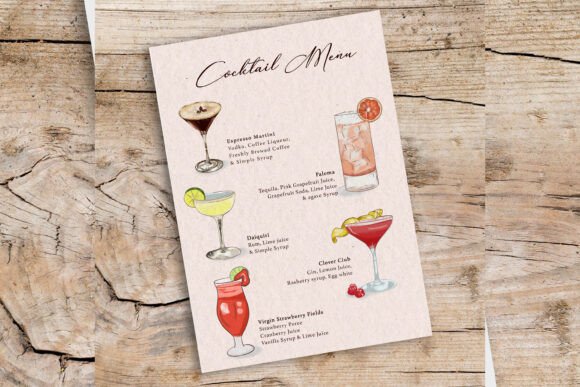
In the world of hospitality and food service, your menu is more than just a list of prices; it is a silent salesperson. It sets the mood before the first bite is taken or the first sip is savored. If you are looking to create an atmosphere that feels artisanal, fresh, and deeply connected to natural ingredients, the Watercolor-Illustrated Drink Menu template is a powerful tool in your design arsenal. This asset moves beyond standard photography and flat graphics, offering a tactile, organic aesthetic that resonates with customers looking for quality and care.
Anatomy of an Artistic Asset
When we talk about modern typography and layout design, technical specifications matter just as much as the artistic flair. This specific template is built for high-end applications. The file comes in at a substantial 3000px by 4000px vertical layout with a resolution of 300dpi. For those not versed in print terminology, this means the image is incredibly crisp. Whether you are printing a large poster for a café wall or shrinking it down for a digital tablet display, the integrity of the image remains intact.
The visual style relies heavily on the "loose" charm of watercolor painting. It avoids the rigid lines of vector graphics, instead embracing the bleed and flow of pigment. This creates a sense of warmth and humanity—signals to your customers that your drinks are likely handcrafted rather than mass-produced. The package includes both a PSD and a JPG file. The JPG is ready for immediate use if you simply want to print the design as-is. However, the real value for designers and entrepreneurs lies in the PSD file. It features organized layers, meaning you can isolate specific elements. You can easily swap out a cocktail illustration for a smoothie graphic or adjust the background wash without having to rebuild the entire composition from scratch.
Strategic Applications for Brand Identity
Understanding where to deploy a creative font or a specialized design asset like this is key to maximizing its impact. The Watercolor-Illustrated Drink Menu is not a one-size-fits-all solution, but rather a specialized asset for specific brand personalities.
- Cafés and Bakeries: This design style screams "artisanal." It pairs perfectly with a rustic interior design, exposed brick, and wooden furniture. It helps establish a brand identity that prioritizes homemade quality.
- Catering and Events: For wedding planners or event organizers, a watercolor theme adds a touch of elegance and romance. It works beautifully for garden parties, bridal showers, or summer galas where the vibe is sophisticated yet relaxed.
- Digital Content and Social Media: Beyond print, this asset shines on social media. The vibrant colors and artistic elements act as a thumb-stopper on Instagram or Pinterest. Content creators can use the individual layers to create engaging stories or reels showcasing new drink recipes.
- Packaging Design: If you are a small business owner selling bottled cold brews or tea blends, elements from this menu can be adapted for your packaging labels. The watercolor style suggests natural ingredients and purity.
Mastering Font Pairings and Readability
A menu design is only as good as its readability. While the illustrations provide the personality, the typography provides the information. When working with a highly stylized template like the Watercolor-Illustrated Drink Menu, your choice of typeface is critical to maintaining a professional look.
The template likely utilizes a mix of display fonts and functional text. As a general rule of design strategy, you should aim for contrast. If the menu headings use a flowing script font to mimic the artistic watercolor style, the descriptions and prices should use a clean sans serif font or a highly legible serif font. This creates a clear visual hierarchy. The customer's eye should naturally flow from the drink name to the description, and finally to the price.
Avoid the temptation to use a handwritten font for the body text. While it looks charming, it often fails the readability test when customers are trying to scan quickly in a dimly lit restaurant or a busy café. Use the artistic fonts for headers to capture attention, and reserve the clean, modern typography for the details. This balance ensures that your menu is not just beautiful, but also functional. It guides the user experience, making ordering easy and intuitive.
Practical Guidance for Customization
For the graphic designer or the DIY entrepreneur, the editing process is where the magic happens. Here are some practical steps to get the most out of this asset:
- Evaluate the Color Palette: Watercolors are vibrant, but they need to match your specific branding. Open the PSD file and use "Hue/Saturation" adjustment layers to shift the watercolor washes to match your brand’s primary colors. If your brand is earthy, shift the blues toward teal or green. If your brand is energetic, boost the saturation of the pinks and oranges.
- Test Your Content: Don't just type your drink names in; test them. Ensure your longest menu item doesn't break the layout. Check that the text contrasts well against the watercolor background. If a wash is too dark behind your text, use a soft eraser tool on the background layer to lighten that specific area, creating a "halo" effect for better legibility.
- Check Commercial Licensing: Before you send this to the printer, verify the licensing. Most premium design assets allow for commercial use, but it is always best practice to confirm that your specific intended use—whether digital downloads or physical merchandise—is covered.
Ultimately, the Watercolor-Illustrated Drink Menu